


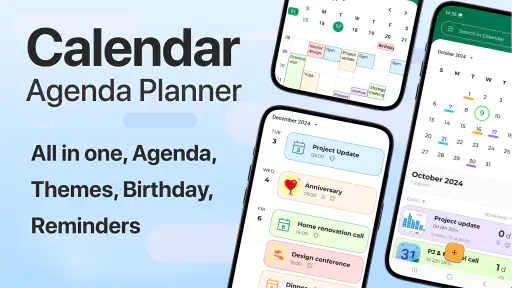
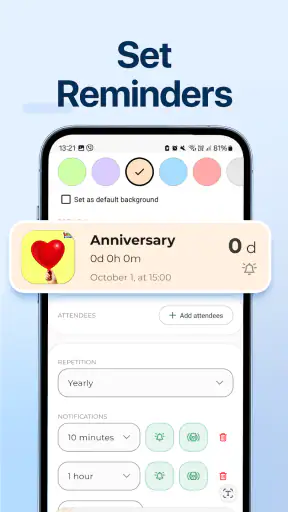
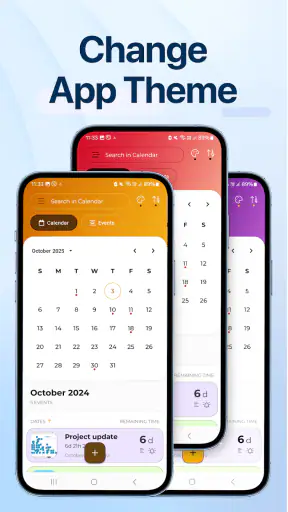
I often lose more time managing a day than actually doing the things on my list. A calendar shows appointments, a notes app holds loose thoughts, and a checklist sits somewhere else, so a simple plan becomes a small exercise in switching between tools. Calendar - Agenda Planner is designed to bring those pieces together. In my experience, its value is less about adding another place to record tasks and more about reducing the number of places I need to check before starting work.
This is a free productivity app from Glad Appvestor, aimed at people who want an agenda, calendar, notes, checklist, and daily planning tools in one space. It is available to everyone and runs on Android with a minimum operating system requirement of version 10. The app has reached over one million installs and holds a 4.4 average from around 4.2 thousand ratings, which suggests that its straightforward approach is connecting with a sizeable group of users.
Why combining the plan matters more than adding another calendar
The recurring problem is not usually a lack of calendar applications. Most phones already include one. The real issue is that appointments and personal tasks behave differently. A meeting has a fixed time, while “buy groceries,” “reply to an email,” or “prepare tomorrow’s materials” may need to happen during a flexible part of the day. When both types of information are kept apart, I can see my commitments without seeing the work required to support them.
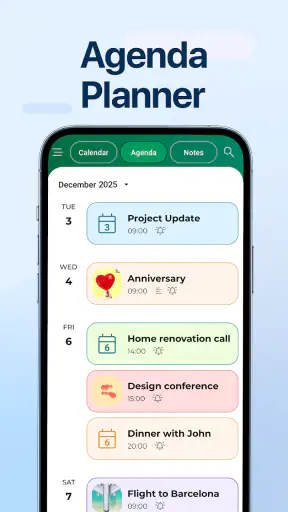
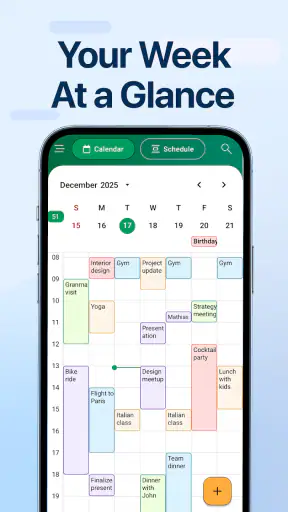
Calendar - Agenda Planner is most useful when I treat it as a daily control panel rather than just a date grid. A scheduled event can define the shape of the day, while notes and checklists capture the preparation, follow-up, and small errands around it. That makes the app relevant to students, home workers, parents, freelancers, and anyone whose day contains a mixture of fixed appointments and unfinished tasks.
The difference becomes clear on a busy day. A conventional calendar might remind me that I have an appointment in the afternoon, but it does not automatically make the related preparation visible. With this app, I can keep a short checklist and supporting note alongside the day’s schedule. I still have to create the entries myself, but the information is easier to review as one plan instead of scattered reminders.
I would not describe it as a replacement for every specialized productivity system. People who need complex project dependencies, team assignments, detailed time tracking, or advanced automation may outgrow its compact approach. Its strength is the ordinary day: the kind of day where a clear view and fewer app changes are more valuable than a large collection of professional controls.
Starting with a useful plan instead of filling every field
My advice is to begin with tomorrow, not with an attempt to organize an entire year. I first look at the fixed commitments, then add only the tasks that genuinely affect the day. After that, I use a note for context and a checklist for actions that can be completed in any order. This setup takes less effort than building a perfect productivity system, and it gives the app a practical test immediately.
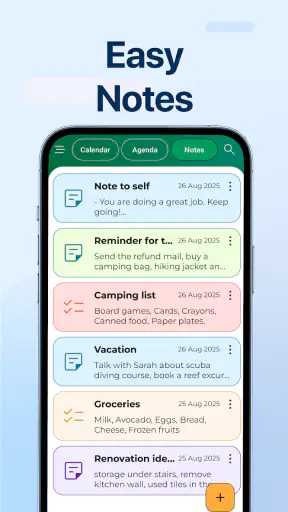
The distinction between a note and a checklist is important. A note works well for information I may need to read more than once, such as a short meeting brief, an address, or ideas for a later decision. A checklist is better for visible progress: items to pack, questions to ask, or steps to complete before leaving home. Mixing both into a single block of text makes progress harder to see, so I find the separation useful.
A simple morning setup can be enough. I review the day, identify the one or two tasks that cannot move, and then place smaller actions around them. This prevents a common planning mistake: creating a long list that looks productive but gives no clue about what should happen first. The app does not need to become a complicated system to be helpful; it works best when the plan stays readable.
There is also a practical reason to avoid overloading the first setup. A planner only saves time when reviewing it is quicker than reconstructing the day mentally. If every minor thought becomes a separate entry, the agenda can become as noisy as the collection of apps it was meant to replace. I get better results by using it as a filter for today, while keeping less urgent ideas in notes for later review.
The current release is version 2.8, and the app was released on August 27, 2025. Those details are useful when deciding whether it fits a device, especially for someone using an older phone. The app is free to install, although in-app purchases cost $3.49 per item. I would check which parts of the experience require those purchases before building a workflow around them, particularly if I want to keep my planning completely cost-free.
How I would use it through an ordinary day
Imagine a workday with a school run, a remote meeting, a grocery stop, and an evening appointment. I would put the fixed events into the calendar first. Then I would create a checklist for the grocery items and another short list for what must be ready before the meeting. A note could hold the meeting points or a reminder about the evening appointment. When I open the day, I see both the timetable and the supporting actions.
This approach is especially useful for transitions. The awkward moments in a day often happen before or after an event, when I remember a related task too late. A checklist attached to the same daily plan gives me a place to record those actions while the appointment is still in view. For example, I can note that a document needs to be sent before a call, rather than relying on a separate memory cue.
For study, I would use the calendar for classes or examination dates, notes for explanations and references, and checklists for revision steps. The advantage is not that the app teaches a study method; it is that the next action can sit near the relevant date. That makes it easier to turn a broad intention such as “prepare for the test” into smaller items that can actually be checked off.
For household planning, the same structure handles recurring mental clutter. A note can contain measurements or details for a repair, while a checklist tracks what needs to be bought. The calendar then keeps the appointment or deadline visible. I like this because household tasks often fail when information is separated: the date is remembered, but the required items are not.
Freelancers may find the app helpful for a different reason. A day can contain client calls, personal administration, and delivery tasks without needing a full project-management workspace. I would use notes for client-specific context and checklists for the small steps around a deadline. This keeps short engagements manageable, though larger projects with several collaborators would be better handled by a dedicated project tool.
Where the app removes small pieces of friction
The biggest improvement is the reduction in context switching. Every switch between a calendar, notes app, and task list creates a chance to forget why I opened the next tool. Keeping these planning elements together makes the review habit simpler: I can inspect the day, read the relevant note, and check the action list without rebuilding the connection between them.
That matters most at the beginning and end of a day. In the morning, I want to know what is fixed and what is flexible. In the evening, I want to see what was completed and what needs to move forward. A combined agenda makes both reviews more natural than a calendar view that only shows appointments.
Another useful trade-off is visibility versus detail. A dedicated notes application may offer a richer writing environment, and a specialized task manager may provide more sorting or project controls. Calendar - Agenda Planner gives me a more compact picture, but the compactness is exactly what helps when I am trying to decide what to do next rather than archive a large amount of information.
I also find the daily-planner angle more practical than a calendar that encourages me to think only in dates. A date tells me when something happens; a daily plan helps me think about how the surrounding work fits together. That distinction is subtle, but it changes how I prepare. I am less likely to treat an appointment as an isolated block and more likely to record the actions that make it useful.
A good habit is to write checklists in physical order when possible. If I need to leave home, I list the items in the order I will encounter them rather than in the order I remembered them. If I am preparing for a call, I list the file, questions, and follow-up action separately. These are small choices, but they turn the app from a storage space into a practical sequence for the day.
I would also keep notes short and searchable in my own mind. A few focused lines are easier to scan than a long diary-style entry when I am already late. For detailed writing, another tool may remain more comfortable. The app’s value comes from placing the right amount of information beside the right day, not from forcing every kind of writing into the planner.
Questions I would consider before making it my main planner
The first question is whether it can replace an existing calendar completely. For someone who only needs a simple personal schedule, it may be enough. For someone whose life depends on advanced calendar ecosystems, shared schedules, or specialized work features, I would compare the exact workflow before switching. The combined planner is appealing, but it should not be chosen solely because it has more categories of information.
The second question is whether it suits people who dislike manual planning. It still depends on entering events, notes, and checklist items. It can make those entries easier to review, but it cannot decide priorities or maintain a plan without input. If I regularly forget to record commitments, the app will not solve that habit by itself. Its benefit appears after I make the small effort to capture the information.
The third question concerns the free experience. The app is free, but optional purchases are listed at $3.49 per item. That is a reasonable detail to consider before relying on any paid capability. I would start with the free workflow, learn whether the combined agenda actually saves me time, and only then decide whether an individual purchase adds enough value to justify it.
Another consideration is scale. I think it is a good fit for personal planning, short projects, errands, study routines, and appointments with related preparation. I would choose a different option for a team that needs shared ownership, comments, approval stages, or a detailed record of project history. A focused personal planner can be easier to use precisely because it does not try to become a complete collaboration platform.
People who prefer a paper diary may also have mixed feelings. The app offers quicker editing and a more flexible way to combine schedules with digital notes and checklists, but paper can remain more satisfying for free-form reflection. I would not move every personal planning habit into the app immediately. I would use it first for time-sensitive commitments and repeatable daily actions, then decide whether it deserves a larger role.
My verdict after judging the time it saves
Calendar - Agenda Planner earns its place by addressing a very specific everyday annoyance: the gap between what is scheduled and what must be done around it. I like that it treats a day as more than a row of appointments. Notes provide context, checklists provide movement, and the agenda gives those pieces a shared frame.
Its strongest users will be people who currently jump between several simple apps and want a calmer daily review. It is also a sensible starting point for anyone who finds full productivity systems intimidating. The workflow is easy to understand: schedule the fixed parts, write down the useful context, and turn the remaining actions into checkable steps.
The limitations are equally clear. It will not replace a sophisticated project manager for complex teamwork, and it will not remove the need for consistent planning. The compact format may feel restrictive to users who need extensive notes, detailed task structures, or highly specialized calendar controls. The in-app purchase model is another point to examine before assuming every desired capability is included at no cost.
For me, the deciding factor is friction. If I can open one daily view and understand where my time goes, what needs preparation, and which small actions remain, I spend less energy organizing and more energy acting. That makes this free productivity app worth trying for personal planning, especially on an Android device running version 10 or later. I would recommend starting with one busy week rather than importing everything at once. If the combined view makes those days easier to manage, Calendar - Agenda Planner has probably solved the problem it was built for.


